
What's JupyterHub?
JupyterHub is an open-source platform that provides Jupyter Notebooks to multiple users simultaneously. Each user receives their own isolated workspace, allowing them to work securely and independently. Administrators can centrally define which software, resources, and images are available. Thanks to flexible integration with various authentication systems, JupyterHub can be seamlessly embedded into existing IT infrastructures. When combined with Kubernetes, the platform can scale automatically by launching dedicated pods for each user—pods being the smallest Kubernetes unit, consisting of one or more containers. This makes JupyterHub particularly well suited for collaborative data science environments, training scenarios, and production-ready analytics platforms.
Jupyter Server Proxy – an explanation
Jupyter Server Proxy is not a new or unusual component of the Jupyter ecosystem. Instead, it is a tool widely used across major Jupyter projects—though it is often overlooked. According to its GitHub repository, its primary use cases include:
- Integration with JupyterHub or Binder to provide users with access to fully independent web interfaces—such as
RStudio, Shiny, or OpenRefine—even though these tools are not part of Jupyter itself. - Secure access to local web APIs through frontend JavaScript, for example in classic notebooks or JupyterLab extensions.
This mechanism is used by the JupyterLab extension for Dask to safely expose locally running services.
As is often the case in the Python ecosystem, the possibilities for creative applications are nearly limitless.
You can, for example, teach users how to work with RStudio or other server-based tools without requiring a full local installation. A major advantage of operating these tools on Kubernetes is containerization: if a server crashes, a simple restart restores a clean and fully functional environment.
The same approach can also be used to host a standalone Shiny app. For scenarios like these, the combination of JupyterHub and BinderHub—another project within the Jupyter ecosystem—is particularly effective.
These examples represent only a small selection of the use cases we have implemented so far. If you would like to learn more about additional possibilities or how to use Jupyter Server Proxy with tools other than RStudio Server,
we recommend referring to the official Jupyter Server Proxy documentation
.
Why does this approach work?
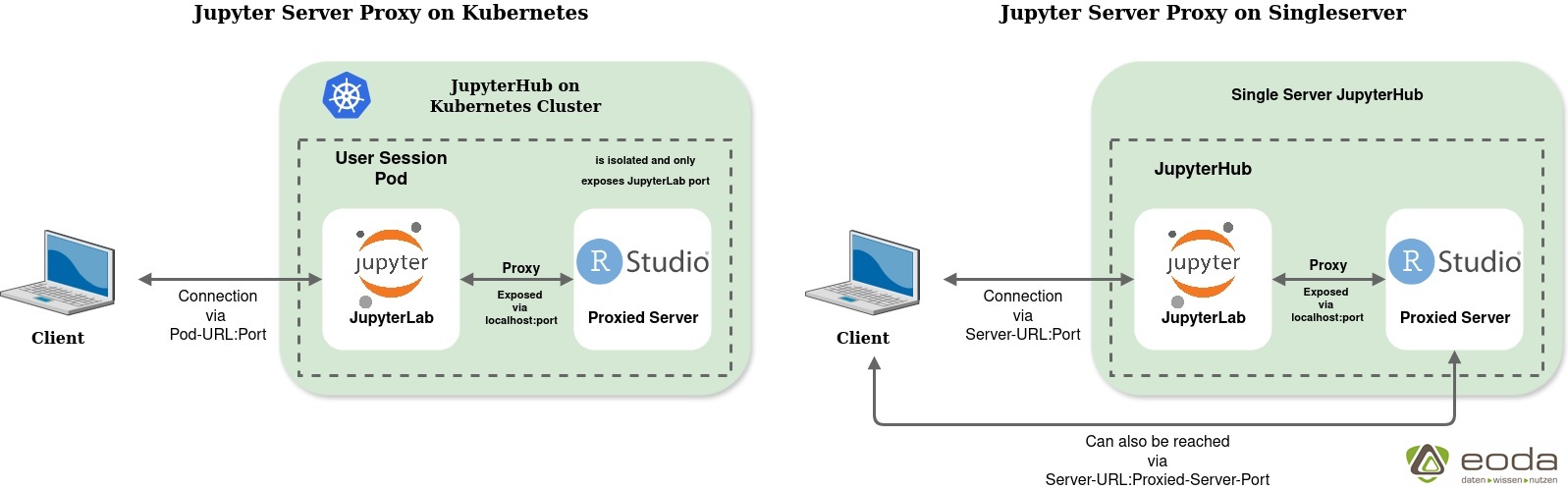
pyter Server Proxy launches the proxied server alongside the running Jupyter server within a user session pod on Kubernetes. In a traditional single-server JupyterHub setup, any user could potentially access this additional service as long as they know the corresponding link and port—because many of these services are typically exposed through endpoints like “localhost:8080”.
In a Kubernetes-based JupyterHub, however, this risk does not exist: all traffic is routed through the individual user session pod and its exposed ports. The pod only opens the ports required by JupyterLab and also handles user authentication. All integrated servers run entirely inside the pod, preventing access by other users. The following graphic illustrates the network connections:
Example
To try out this solution yourself, you first need a JupyterHub running on Kubernetes that you can configure according to your requirements, as well as a container registry from which you can push and pull your images. If you do not currently have access to a Kubernetes-based JupyterHub, you can easily set one up for testing using Minikube and the official guide “Zero to JupyterHub with Kubernetes.”
Next, create a container image for your user server and store it in your registry. In this image, you install RStudio Server along with the preconfigured Jupyter Server Proxy — using one of the standard JupyterHub images as the base. The Jupyter project provides official images, including those available in the Red Hat Container Registry.
Below is a minimal proof-of-concept Dockerfile demonstrating this setup. To keep the image size small and reduce build time, we use Jupyter’s minimal-notebook image:
ARG REGISTRY=quay.io
ARG OWNER=jupyter
ARG BASE_CONTAINER=$REGISTRY/$OWNER/minimal-notebook
FROM $BASE_CONTAINER

# set user for installation
USER root

# Set working directory for installation
WORKDIR /opt/

# Install general system dependencies
RUN apt update && \
    apt install -y \
    gdebi-core \
    git \
    curl && \
    apt autoremove -y && \
    apt clean && \
    rm -rf /var/lib/apt/lists/*

# Install R + RStudio-Server
ARG R_DIR=/opt/R
ARG R_VERSION=4.4.0
ARG RSTUDIO_VERSION=2024.04.2-764

RUN curl -O https://cdn.rstudio.com/r/ubuntu-2404/pkgs/r-${R_VERSION}_1_amd64.deb && \
    apt update && \
    gdebi --non-interactive r-${R_VERSION}_1_amd64.deb && \
    rm r-${R_VERSION}_1_amd64.deb

RUN ln -s /opt/R/${R_VERSION}/bin/R /usr/local/bin/R && \
    ln -s /opt/R/${R_VERSION}/bin/Rscript /usr/local/bin/Rscript

RUN curl -O https://download2.rstudio.org/server/jammy/amd64/rstudio-server-${RSTUDIO_VERSION}-amd64.deb && \
    gdebi --non-interactive rstudio-server-${RSTUDIO_VERSION}-amd64.deb && \
    rm rstudio-server-${RSTUDIO_VERSION}-amd64.deb && \
    rm -rf /var/lib/rstudio-server/r-versions

# install jupyter-server-proxy
RUN pip install jupyter-rsession-proxy

# set user for session
USER ${NB_UID}

# Set working directory for session
WORKDIR "${HOME}"
As your next step, configure your JupyterHub to use the newly created image. Adjust the singleuser configuration as follows:
singleuser:
  profileList:
    - display_name: "JupyterLab with RStudio"
      description: "JupyterLab with Jupyter Server Proxy for RStudio"
      kubespawner_override:
        image: {{ your-registry }}/{{ image-name }}
After updating the configuration and restarting JupyterHub, the new session image will appear in the server selection list. Launch a new server using this image — you can then start RStudio Server directly from within JupyterLab.
Conclusion
The combination of JupyterHub, Kubernetes, and Jupyter Server Proxy provides an efficient way to integrate additional tools such as RStudio Server or Shiny into existing data science platforms. For companies and teams, this results in:
- reduced administrative effort,
- reproducible and stable working environments,
- greater flexibility in choosing tools,
- and high scalability for trainings and projects.
We are happy to support you in implementing such solutions
within your infrastructure or in building customized data science platforms.
Author
Get started now:
We look forward to exchanging ideas with you.

Your expert on Data-Infrastructures:
Ricarda Kretschmer
infrastructure@eoda.de
Tel. +49 561 87948-370
